Checkers: Classic Board Game
- 4.8
- Rating
- 1.00M
- Installs
- Free
- Price
 Analysis by App-foxy
I tend to trust a board game that explains itself in a few seconds, and Checkers: Classic Board Game makes a good first impression for exactly that reason. It takes the familiar checkers board and turns it into a focused mobile game rather than burying the main activity under a crowded collection of extras. I installed it expecting a quick way to play a traditional strategy game, and that is still the clearest reason I would recommend it: it is easy to understand, quick to open, and suitable for short sessions.
Developed by One Way Street Entertainment, this free board game is aimed at an Everyone audience. It arrived on December 6, 2024, and its current version is 2.33.0, with Android 7.0 or later required. Those details make it accessible to a wide range of Android devices, including older phones that may struggle with more demanding games. The public response is also strong, with a 4.8 average from around 51 thousand ratings and over a million installs.
That popularity should not be mistaken for a promise that every player will love it. Checkers is naturally repetitive if you want deep variety, and a simple board interface can feel limited beside chess apps, online board-game platforms, or games packed with visual rewards. My experience is that this title works best when I want a clean, recognizable game of checkers without a long learning curve. It is less convincing if I am looking for a broad competitive community or a large set of connected features.
You May Also Like

 Blood Strike: 2.5 Anniversary
Blood Strike’s Loadouts Turn Every Drop Into a Tactical Gamble
A close look at Blood Strike’s custom loadouts: how fast access to signature weapons reshapes its battle royale rhythm, rewards preparation, and narrows the gap between fights.

 Pandora - Music & Podcasts
Pandora’s Music Is Easy to Start, but Harder to Recover
Pandora’s strength is its low-effort path from a seed to a station. Its weak spot is how much confidence it asks you to place in connection, setup, and quiet recovery.

 8 Ball Pool
 Is Built on Rivalries, Rematches, and Routine
A close look at the rivalries, rematches, shared routines, and unanswered safety questions that turn a quick pool match into a persistent mobile community.

 Samsung Music
’s Quiet Strength Is Playing What You Already Own
Its reach comes less from spectacle than from dependable access to a personal library. That simplicity is both the app’s strongest retention engine and its ceiling.

 AccuWeather: Weather Radar
AccuWeather Review: A Quick, Clear Forecast for Everyday Decisions
For everyday plans, the best forecast is the one you can understand quickly. AccuWeather makes rain timing, radar, and local conditions easy to act on, with a few trade-offs.

 Hill Climb Racing
Why Hill Climb Racing Still Turns Crashes Into One More Run
A tiny car, a bumpy hill and one more upgrade: Hill Climb Racing keeps resurfacing because its simple chaos makes every near-miss feel personal.
More From Our News Desk



Getting past the first moments without unnecessary frustration
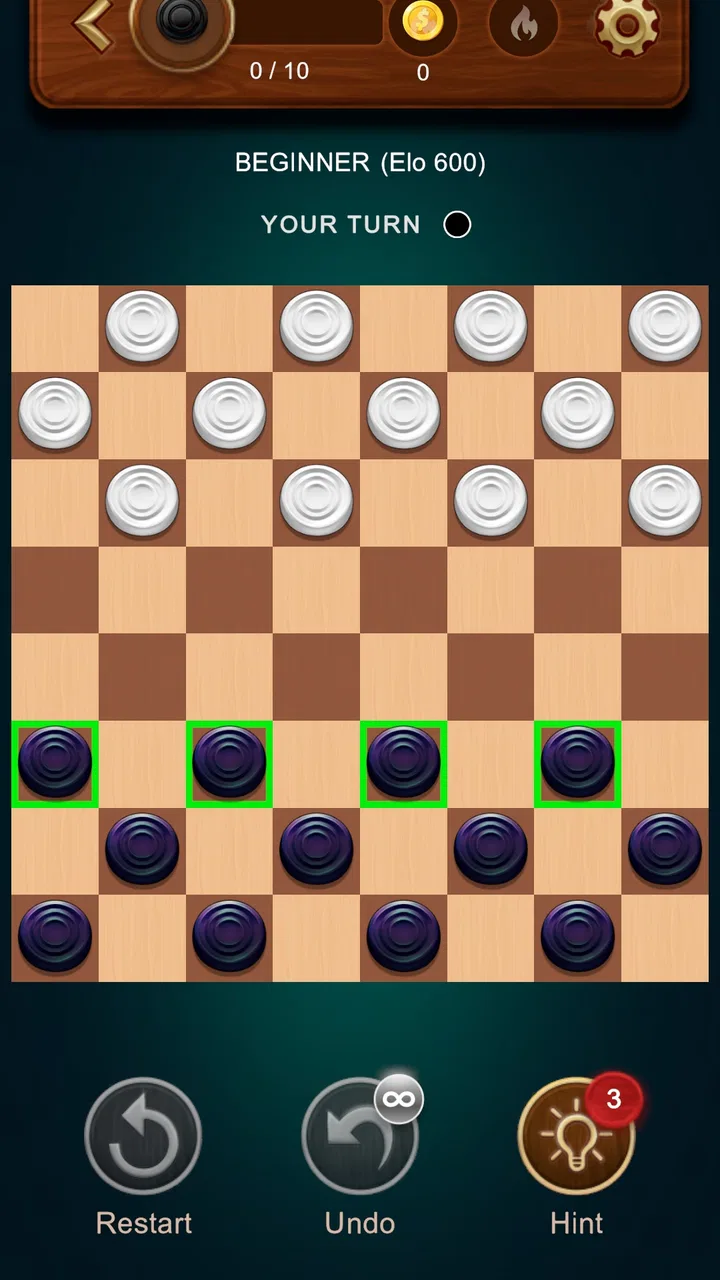
The main place a new player can get stuck is not the rules. Most people already know that pieces move diagonally and capture opposing pieces by jumping over them. The friction comes from translating those familiar rules into touch controls. On a phone, the board is smaller than a physical set, and a tap can feel ambiguous when several pieces are close together. I found it useful to slow down for the first few turns instead of tapping rapidly and assuming the game had ignored me.
My practical advice is to treat each turn as a two-step action: first identify the piece you intend to move, then check the destination before confirming the movement. This sounds obvious, but it prevents the most common mobile-board mistake: selecting the correct piece and then touching the wrong square. A quick game encourages hurried input, especially when a capture looks obvious. Taking an extra moment is more valuable than trying to play at a desktop pace.
Another early sticking point is the difference between what I want to do and what the rules allow. A move that looks visually reasonable may not be legal, particularly when a capture is available elsewhere on the board. If a piece does not respond as expected, I first recheck the position rather than assuming the app has failed. In a traditional game, the board itself gives this feedback naturally; on a phone, the player has to pay closer attention to the selected piece and available squares.
The most useful habit is to diagnose the board before diagnosing the app. If the game appears not to react, I check whether I selected a piece belonging to the active side, whether the destination is diagonally reachable, and whether another capture changes the legal choices. This simple routine avoids restarting a match unnecessarily and helps new players understand the rules through play.
What to check before blaming the controls
Touch input can also feel inconsistent when a finger covers part of the board. I get better results by tapping near the center of a piece or square instead of its edge. On a compact screen, a fingertip can obscure the exact location being selected, so a deliberate tap is more reliable than a swipe or a series of quick touches. I would not approach this game as a fast-action title; its design rewards careful selection rather than speed.
If the board seems frozen immediately after a move, I wait briefly and look for a visual change before tapping again. Repeated taps can make it harder to tell whether the first input registered. This is especially important in a turn-based game because the board may be transitioning from my move to the opponent's turn. The safest workflow is one input, one visual check, and only then another action.
New players may also wonder whether they need an account or a complicated setup before they can begin. My experience with the game is that its appeal lies in getting to the board quickly, not in managing a profile or preparing a long campaign. I would still install it from the official Android source, allow the installation to finish completely, and open the game normally rather than launching it repeatedly while the device is still completing setup.
Because the minimum operating requirement is Android 7.0, compatibility should be straightforward on supported phones, but compatibility is not the same as comfort. A device may technically run the game while still having a crowded screen, aggressive battery management, or limited free storage. If the first launch feels unusually slow, I would close other apps and try again before concluding that the game itself is defective.
A low-friction setup routine
I use a short preparation routine for any board game on a phone. I confirm that the device is running a supported Android release, make sure the installation has finished, close demanding apps, and open the game with the phone held in the orientation that gives me the clearest view of the board. I then play a few moves slowly, checking how selection and movement behave before starting a serious match.
This routine matters because a checkers game does not need much hardware power, so unusual behavior is often caused by the surrounding phone environment rather than the board logic. A nearly full storage drive, a temporary system slowdown, or a background app consuming memory can make a lightweight title feel unreliable. Restarting the phone is not glamorous advice, but it is often more useful than repeatedly reinstalling a game that was already installed correctly.
I would also avoid changing several things at once. If the game does not open, first close other apps and retry. If that fails, restart the device. Only after those simple checks would I consider reinstalling. Changing multiple settings simultaneously makes it difficult to know what solved the problem, and it can create extra work for a game that should otherwise be ready for a short session.
Recovering a match when something interrupts the flow
Short board games are often played in imperfect situations: while waiting for an appointment, during a commute, or between household tasks. That makes recovery more important than it might seem. If I leave the game unexpectedly, I reopen it calmly and check the board state before making another move. I do not assume that the last tap failed or succeeded until I can see whose turn it is and which pieces remain.
When a match appears to have reset, I separate two questions. Did the application close, or did the match simply return to a starting screen? And was the interruption caused by the game, or by the phone reclaiming memory? The answer changes what I do next. If the app closes once but works normally after reopening, I continue cautiously. If several other apps are also being removed from memory, I treat the phone environment as the more likely source of trouble.
For an important personal match, I find it helpful to pause mentally at the end of each turn and remember the broad position: which side has the advantage, whether a capture is available, and whose move comes next. I am not suggesting that players keep a formal record for casual checkers. The point is simply that a quick mental snapshot makes recovery less confusing if the screen changes or the app is interrupted.
A particularly useful workflow is to avoid pressing the same square repeatedly when the board does not respond. Repeated input can create uncertainty about whether I am selecting, moving, or cancelling something. Instead, I wait, inspect the board, and then make one deliberate selection. If the game remains unresponsive, I exit and reopen it rather than spending several minutes tapping randomly.
This is also where the game's focused design helps. There are fewer layers to navigate than in a large multiplayer platform, so returning to the central activity is relatively direct. The trade-off is that a focused game may not provide the same depth of match management, social recovery, or long-term progression that a larger board-game service offers. For a casual session that simplicity is a strength; for organized competition it may feel spare.
How I use it in an ordinary day
My favorite use case is a ten-minute waiting period when I want something more engaging than scrolling but less demanding than a full action game. I can begin thinking immediately, play several turns, and stop without needing to remember a complicated story or control scheme. Checkers fits that gap well because the rules are familiar while the decisions still require attention.
It also works as a gentle introduction to turn-based strategy. I would hand it to someone who knows the basic idea of checkers but does not want to study a manual before playing. The board gives that person a chance to learn through mistakes: recognizing forced captures, protecting pieces, and planning around promotion. Those lessons are modest compared with chess strategy, but they are meaningful and approachable.
For families, the Everyone rating is reassuring, and the traditional format is easy to explain across age groups. Still, I would not assume that the app automatically replaces a physical board for shared play. A phone screen is personal and relatively small, so two people sitting together may find a real set more comfortable. This mobile version is better when convenience matters or when another player is not physically nearby.
Solo players should consider what kind of opponent they want. A digital opponent is convenient because it is always available, but it cannot reproduce the social experience of playing across a table. If your motivation comes from conversation, visible reactions, and a shared physical space, a traditional board remains the better choice. If your priority is immediate access to a familiar puzzle, the app is more practical.
Where it compares well, and where alternatives win
Compared with a physical checkers set, the app wins on portability and readiness. I do not need a table, storage space, or another person nearby. It is also easier to fit into a small break. The physical set wins on tactile satisfaction, visibility, and social presence. Neither option is universally better; they serve different moments.
Compared with chess apps, this game is easier to enter but offers a narrower strategic ceiling. Chess provides more piece types, opening theory, and long-term study material. Checkers is more welcoming when I want to start playing immediately, but players who enjoy analyzing complex positions may outgrow its smaller rule set. I would choose this title for approachability, not for the deepest possible board-game curriculum.
Compared with broad board-game platforms, its focused identity is appealing. A platform may offer more opponents, modes, rankings, and social tools, while also demanding more navigation and sometimes more attention to accounts or matchmaking. Checkers: Classic Board Game is a better fit when I want the board itself to remain the center of the experience. It is not the choice I would make for a large online community or a constantly changing catalog.
The free price lowers the risk of trying it, especially for someone who wants a familiar game rather than a major commitment. At the same time, free access does not remove the possibility of personal friction: some users may prefer more customization, more structured progression, or a stronger sense of competition. I would decide based on the kind of session I want, not simply on the fact that downloading it costs nothing.
When the app is not really the cause
Not every interruption belongs to the game. If the entire phone is slow, other apps are closing, or touch input is delayed outside the board, I look at the device first. Low available storage, an overloaded background process, or a temporary operating-system problem can affect a simple game just as easily as a demanding one. Testing another app is a useful comparison: if several apps behave badly, reinstalling this one is unlikely to solve the underlying issue.
Network assumptions can also lead to the wrong diagnosis. A player may expect every mobile game to behave like an online service, but a classic board game is primarily valuable for the board interaction itself. If a problem appears around connectivity, I would check the phone's connection and retry later rather than repeatedly tapping the screen. I would also avoid installing unofficial modified versions in an attempt to bypass a problem, because that introduces a separate security and reliability risk.
Display settings can create their own confusion. Very small text, unusual scaling, or a damaged touch area may make a legal move look impossible. Before reporting a gameplay issue, I would test the same area of the screen in another app and clean the display. A screen protector or hardware fault can affect precision even when the game is functioning normally.
Finally, I would remember that checkers rewards patience. A position that feels unfair may simply reflect a missed capture or an earlier move that left a piece exposed. Reviewing the previous turn is often more productive than restarting. This is one of the game's quiet strengths: it encourages me to inspect my decisions rather than blaming every unfavorable result on the opponent or the interface.
My practical verdict after using it
I recommend Checkers: Classic Board Game to anyone who wants a straightforward mobile version of a familiar board game, especially for short solo sessions, casual learning, or filling small gaps in the day. Its free availability, broad device support, and simple premise make it easy to try. The strong average rating and large install base also suggest that its uncomplicated approach has connected with many players.
I would skip it if my main goal were a rich online community, tournament-style competition, extensive customization, or a deep strategy course. In those situations, a larger board-game platform or a dedicated chess application may offer more of what I need. I would also choose a physical set when the social experience of sitting across from another person matters more than convenience.
For everyone else, the best way to use it is to play deliberately. Tap the center of the intended piece, verify the destination, wait for the board to update, and inspect the position before assuming an error. If the application behaves strangely, check the phone, close competing apps, and reopen it in a controlled way. Those small habits remove most of the avoidable friction I encountered.
My final impression is positive but appropriately modest: this is not trying to reinvent checkers, and that is exactly why it works. Its real strength is dependable simplicity for people who want to start playing rather than configure a gaming system. If that matches your expectations, One Way Street Entertainment's board game is an easy recommendation. If you want layers of competition and customization around the board, look elsewhere; if you want the board itself, ready when you are, this version makes a convincing case.
FAQs for Checkers: Classic Board Game
01What are the main features of Checkers: Classic Board Game?
Checkers: Classic Board Game offers a rich, traditional experience with customizable difficulty settings, a variety of board themes, and both online and offline modes. Players can enjoy smooth, intuitive controls and a user-friendly interface. The game also provides a hint system and a tutorial for beginners, ensuring an accessible experience for all skill levels.
02Is Checkers: Classic Board Game available for both Android and iOS devices?
Yes, Checkers: Classic Board Game is available for download on both Android and iOS platforms. You can find it on the Google Play Store for Android devices and the Apple App Store for iOS devices, ensuring a wide range of compatibility and allowing you to enjoy the game on your preferred device.
03Does Checkers: Classic Board Game require an internet connection to play?
Checkers: Classic Board Game can be enjoyed both online and offline. While an internet connection is required for multiplayer matches, the game offers a robust offline mode, allowing players to compete against AI opponents. This makes it a perfect choice for gaming on the go, even without internet access.
04Are there any in-app purchases in Checkers: Classic Board Game?
Checkers: Classic Board Game may include some in-app purchases, such as premium board themes or additional difficulty levels. However, the core game is free to play, and these purchases are optional, allowing players to enhance their gaming experience without any compulsory costs.
05How can beginners learn to play Checkers using this app?
The app includes a comprehensive tutorial to help beginners understand the rules and strategies of Checkers. Additionally, it features a hint system that provides guidance during gameplay. These tools are designed to assist new players in learning the game at their own pace, making it an ideal choice for both beginners and seasoned players.
Pros
- Intuitive UI for easy navigation
- Multiple difficulty levels for all players
- Offline mode available
- Minimal ads enhance gameplay
- Customizable board designs
Cons
- Limited online multiplayer options
- Occasional crashes on older devices
- No tutorial for beginners
- In-app purchases can be pricey
- Sound effects lack variety

Checkers: Classic Board Game
Gallery